Facebook Community
 Change Log
 Help Center


- What Is An AI Landing Page Generator?
- Benefits of Using AI for Landing Page Creation
- Limitations and Downsides of Free AI Landing Page Generators
- 5 AI Landing Page Generators, Reviewed
- Building Pages Through Claude or ChatGPT with GemPages MCP
- Why GemPages Might Be a Better Option for Your Business
- Which One Should You Actually Install?
- FAQs about AI Landing Page Generators


Best Free AI Landing Page Generators: Tools Compared for 2027
Most lists of free AI landing page generators have the same problem: the tools on them are not free. We checked the pricing page of all five tools below in October 2026, and only one lets you publish a live page without paying.
That matters, because the point of a landing page is to be live. A page you can build but not publish does nothing for your conversion rate.
Short answer: if you sell on Shopify and want a page live this week without paying, GemPages is the only option here with a free plan that publishes (one page). If you have budget and build landing pages outside Shopify, Landingi from $24/month. If you want a site and hosting together, Hostinger or 10Web. If you just want the fastest rough draft from one prompt, Appy Pie, but you cannot publish it for free.
How we checked: every price, plan name, and AI feature below was verified against each vendor’s own pricing and product pages in October 2026. Where a marketing page and a pricing page disagreed, we used the pricing page. Feature names change often in this category, so we have flagged the ones that have been renamed. GemPages is our own product, and we have listed what it cannot do alongside what it can.
What Is An AI Landing Page Generator?
An AI landing page generator is a smart tool that uses artificial intelligence to quickly create professional landing pages, the kind of web pages designed to turn visitors into leads or customers.
Instead of building everything from scratch, you just give it some basic details like your product, service, or goal, and the AI takes care of the rest. It can suggest layouts, write headlines and body text, choose colors, and even arrange images in a way that’s most likely to convert visitors.
Most AI landing page generators, like GemPages - customize for Shopify, come with customizable templates, drag-and-drop editors, and features like A/B testing or integrations with email marketing tools. This means, with the right landing page builder tool, you don’t need to be a designer or coder, but still be able to create and optimize a conversion-ready page in minutes.
Benefits of Using AI for Landing Page Creation
If you run an eCommerce or Shopify store, your landing pages are often the first (and sometimes only) chance to turn a visitor into a buyer. That’s why more merchants are turning to an AI landing page generator to build pages faster and smarter, more personalized, and consistently optimized for conversions.
Here’s how AI can transform your landing page game:
1. Personalize Shopping Experiences at Scale
AI will personalize the content to each shopper.
By analyzing browsing history, purchase behavior, and even actions like cart abandonment, AI-powered tools can:
- Show dynamic product suggestions based on individual interests.
- Adjust messaging for different regions or audiences automatically.
- Change calls-to-action in real time depending on where a shopper is in the buying journey.
The result? Every visitor feels like the page was built just for them, boosting engagement and sales.
AI can personalize the shopping experience through a personalized description.
2. Launch Pages Faster (and Smarter)
Peak sales periods and flash deals wait for no one. An AI landing page generator can create a conversion-ready page in minutes using proven templates and smart block suggestions. Plus, you can:
- Get automated layout recommendations that match your niche.
- Run built-in A/B tests where AI continuously learns which headlines, images, and buttons work best.
- Generate persuasive copy instantly, keeping your brand’s voice consistent.

3. Build with Data, Not Guesswork
AI tools analyze real shopper behavior to design layouts that guide visitors toward checkout. You’ll benefit from:
- Visual hierarchy optimization so key elements naturally grab attention.
- Automatic mobile optimization for fast loading and perfect display on any device.
- Trust-building features like reviews, guarantees, and urgency timers are placed exactly where they work best.
4. Get Insights That Drive Conversions
With integrated analytics, AI doesn’t just help you launch but also helps you improve. You can:
- See heatmaps showing where visitors click, scroll, or drop off.
- Learn which headlines and visuals your audience connects with most.
- Receive SEO-friendly suggestions to boost organic traffic.

A heatmap showing how visitors move through a page.
5. Empower Your Team (Even If You Work Independently)
You don’t need coding skills or a big design team. An AI landing page generator gives you:
- A no-code, drag-and-drop editor anyone can use.
- Automatic brand consistency across fonts, colors, and tone.
- Faster collaboration between marketing, design, and growth teams.
Learn more: Top 5 AI Shopify Landing Page Builder You Need To Know
Limitations and Downsides of Free AI Landing Page Generators
While an AI landing page generator can be helpful for eCommerce store owners, it’s not without its drawbacks. Understanding these downsides will help you use AI strategically and maximize the benefits without falling into common traps.
1. They Invent Facts to Fill Gaps
This is the expensive one. An AI writer asked for a landing page will produce a confident page, and if your input did not include a review count or a shipping guarantee, many tools will write something plausible anyway. That is how a rating you never earned or a guarantee you do not offer ends up live on your store.
Read every number, review, and guarantee on a generated page before you publish it. Treat specifics as unverified until you have checked them against your own data.
2. Risk of Generic or Unoriginal Content
AI can complete creating pages fast, but if you rely on it too much, your store might start looking and sounding like everyone else’s. Without a human touch, your brand’s personality will not be highlighted. For example:
-
Product descriptions might feel flat or repetitive.
-
Headlines may sound “templated” instead of unique.
-
Visual layouts could start blending in with competitors using similar tools.
Tip: Use AI to speed up the process, but always add your own creativity, storytelling, and brand voice.
Learn more: AI-Powered Website Optimization — Guide, Tools, Tips
3. The Learning Curve
Even though many AI tools are designed to be user-friendly, there’s still a bit of a learning curve, especially if you’re new to digital marketing or web design. In this case, when training your AI tool, you’ll need to:
-
Learn how to tweak AI suggestions so they match your store’s goals.
-
Understand A/B testing results and apply the right changes.
-
Navigate new dashboards and settings for analytics, personalization, and integrations.
If you or your team don’t have the time to learn the tool properly, you might not get the full value from it.
4. Privacy and Data Concerns
AI landing page generators often use customer data to personalize the shopping experience. This means:
-
You’ll be collecting and processing visitor behavior data.
-
Some data may be handled by third-party AI platforms.
-
You’ll need to ensure you comply with privacy laws (like GDPR or CCPA) and protect customer trust.
For Shopify store owners, that means having clear privacy policies and being transparent about data usage.
5 AI Landing Page Generators, Reviewed
1. GemPages
GemPages is a Shopify page builder built around conversion rather than design for its own sake. It is the only tool in this list with a free plan that publishes a live page.
Alongside the drag-and-drop editor you get CRO elements that affect revenue directly: countdown timers, stock counters, bundles, and post-purchase upsell and downsell offers that run after checkout. A/B offer testing inside sales funnels lets you find which offer converts rather than guessing.
If you want AI to do the structural work, that now happens through GemPages MCP rather than inside the editor. It is in beta, and it is covered in its own section below.
Free plan: Yes. One published page, which is enough to test a single campaign or product page before paying.
Pricing: Free · Build $29/month · Optimize $59/month · Enterprise $199/month.

The GemPages editor, where you finish any generated page.
Key features of GemPages include:
-
Drag-and-drop editor: build and restructure pages without touching code, with pixel-level control over each section.
-
Stock Counters & Countdown Timers: Built-in urgency elements that create scarcity and drive immediate action from visitors.
-
Dynamic Upsell & Downsell Triggers: Automated offer sequences that increase average order value with intelligent targeting.
-
Conversion Analytics: Track performance metrics to understand what's working and maximize your sales potential.
-
400+ templates and pre-built theme sections: high-converting layouts tailored for different niches and industries.
-
Mobile-First Design: Responsive layouts that deliver a perfect user experience across all devices automatically.
-
Headless page support: compatible with Shopify Hydrogen and Oxygen, with lazy loading and code optimization.
-
GemPages MCP: generate an editable GemPages page from HTML, an image, or a page URL, through a compatible AI assistant. Covered in its own section below.
|
Pros |
Cons |
|
Post-purchase upsell and A/B offer testing target AOV, not just page design |
Some advanced CRO features are locked behind paid plans |
|
400+ proven templates eliminate guesswork in design |
Learning curve if you want to use the full analytics & testing toolkit |
|
Drag-and-drop customization with zero coding required |
Only works with Shopify with no multi-platform use |
|
Built-in CRO tools like urgency timers and upsell popups boost sales automatically |
|
|
Mobile-first layouts, plus headless page support for Hydrogen and Oxygen |
|
|
Free plan publishes a live page, unlike most tools on this list |
Free plan is capped at one published page, so a real campaign cadence means paying |
Learn more: AI Shopify Store Builder: Everything You Need to Know
How to Generate a GemPages Page With an AI Assistant
This runs through GemPages MCP, that allows you to connect GemPages to a compatible AI assistant once, then work in that assistant rather than in the GemPages dashboard. Full setup steps are in the GemPages MCP introduction.
What you can start from. GemPages describes three input types for page generation:
-
HTML: import an existing HTML page as the source.
-
Image: use a screenshot, mockup, or campaign design as the visual reference.
-
URL: point it at an existing webpage. GemPages is explicit about the condition here: only use webpages and assets that you own or have permission to reuse.
The prompts. Every instruction starts by naming the connector, which appears as GemCommerce MCP in your AI assistant:
-
From an image: Use GemCommerce MCP. Use the attached image as the visual reference and create an editable page in GemPages.
-
From a URL: Use GemCommerce MCP. Create an editable page based on this URL: [URL].
-
From HTML: Use GemCommerce MCP to turn landing-page.html into an editable GemPages page.
What comes back. The page is built section by section and validated against GemPages generation rules as it goes, then you get a preview URL and an editor URL. You finish it in the editor and publish it yourself. GemPages does not publish anything for you.
Learn more: Step-by-step guides for each input: generating a page from HTML, content research, and turning a finished article into HTML.
2. Landingi
Landingi is a specialized landing page builder designed to help you create pages that actually convert, without the distractions of full website builders.
Its AI products carry their own names, which is worth knowing because older articles still reference feature names that no longer exist: Lunar generates landing pages, Solis analyzes a page and suggests CRO improvements, and Orbit is its MCP server. Combined with a drag-and-drop editor and 400+ templates, it is a capable tool, but note that it is not a Shopify page builder.
Free plan: None. Landingi offers a 14-day trial capped at 200 visits. Paid plans run $24 to $1,199+ per month, billed annually. Checked on the Landingi pricing page, October 2026.

Landingi focuses on landing pages rather than full websites. Source: Landingi
Key features of Landingi include:
-
Solis: AI optimization suggestions and alerts on live pages, covering layout, headlines, CTAs, and visual hierarchy.
-
Lunar: AI landing page generation, including headlines, descriptions, and CTAs tailored to your audience.
-
AI Image Editor: Enhance, resize, or retouch product images without leaving the platform.
-
400+ High-Converting Templates: Templates designed specifically for landing pages, covering lead gen, sales, and product launches.
-
Drag-and-Drop Editor: Build and customize without coding; easily add forms, videos, and product showcases.
-
Built-in A/B Testing: Test different versions of your page to find the highest performer.
-
Pop-up and Form Builder: Capture leads directly on your landing pages with customizable forms and pop-ups.
-
Shopify Buy Button: embed a Shopify product buy button on a landing page. This is an embed, not a native Shopify integration.
|
Pros |
Cons |
|
Solis removes guesswork in improving conversions |
No free plan, only a 14-day trial capped at 200 visits |
|
400+ landing page-specific templates save time |
Visitor limits on lower-tier plans |
|
Built-in AI copywriting and image editing tools |
Advanced features are only available in higher plans |
|
Drag-and-drop builder is easy for non-tech users |
|
|
Integrated A/B testing and analytics |
Learn more: Create A Book Landing Page in Minutes: 5 Easy Steps (+6 Real Examples)
3. Hostinger
Hostinger is best known for its reliable hosting, but its AI Website Builder makes it one of the most versatile tools for Shopify store owners who need a fast, professional landing page.
Its builder is now a single product called AI Builder with two modes: Manual (drag-and-drop) and Agentic (describe what you want in chat). You tell it about your business, products, and style, and it generates a complete landing page you then edit.
Free plan: None. The Hostinger website builder page asks in its own FAQ whether it is a free website builder, and answers no. There is a 14-day trial. Paid plans start at $10.99/month at renewal, checked October 2026.

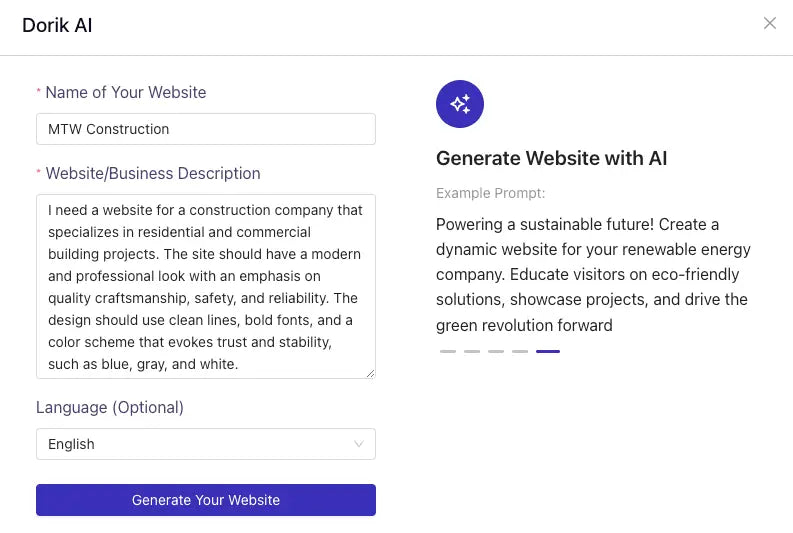
Type and click, that’s all you need to create a landing page with an advanced AI landing page generator like Hostinger. Source: Dorik
Key features of Hostinger include:
-
AI Builder: generate a complete, branded landing page from a text prompt, then edit it manually.
-
AI Writer: Create persuasive product descriptions, headlines, and CTAs in seconds.
-
AI Image Generator: Produce unique visuals for your products or hero sections directly from text prompts.
-
AI Logo Maker: Generate a custom logo for your store without hiring a designer.
-
AI SEO Assistant: Suggests keywords, meta tags, and on-page optimizations to boost search rankings.
-
AI Heatmap: worth understanding before you rely on it. This is a predictive heatmap generated from a screenshot. Hostinger’s FAQ states plainly that it does not track actual user clicks or scrolls, so treat it as a design opinion rather than behavior data.
-
AI Product Details Generator: Upload a product image and get a compelling description tailored to your audience.
|
Pros |
Cons |
|
Text-to-website AI quickly builds fully functional landing pages |
No free plan at all, despite appearing on many free tool lists |
|
All-in-one AI toolkit: writer, image generator, SEO, logos, heatmaps |
Less advanced eCommerce-specific CRO features than specialized tools |
|
AI Heatmap gives a quick predictive read on layout, with no tracking setup |
Shopify integration may require extra setup |
|
Industry-specific templates speed up creation |
Best suited for small to mid-size stores |
|
Reliable hosting included ensures fast load times |
Learn more: Top 7+ Free Lead Generation Tools
4. 10Web
10Web takes the stress out of landing page creation by combining AI-driven design with built-in optimization for speed, SEO, and mobile.
It builds WordPress sites from a prompt, a link, a file, or a Figma design, and the AI handles layout, copy, and image generation. It markets a 90+ PageSpeed score on desktop and mobile, which is the vendor’s own claim rather than an independent measurement.
Free plan: None, and this one has a consequence worth knowing in advance. The trial is 3 days with 5 AI credits, and if you do not subscribe when it ends, the site is deleted. Do not build anything you care about on the trial without planning to pay. Paid plans start at $10/month billed yearly, checked on the 10Web pricing page in October 2026.

10Web allows you to generate the entire website from your input and description, even with a few words. Source: 10Web
Key features of 10Web include:
-
AI Website Builder: Creates a complete, branded page from a simple description, including structure, copy, and images.
-
AI editor: chat with AI to add, edit, or redesign sections. Older articles call this “AI Co-Pilot”; that name has been retired.
-
AI Writer: Generates high-quality, SEO-optimized product descriptions, headlines, and CTAs.
-
AI Image Generator: Produces unique, high-resolution visuals to match your brand style.
-
Responsive Design: Automatically optimized for desktop, tablet, and mobile devices.
-
Performance Optimization: CDN, caching, and image optimization, with a 90+ PageSpeed score claimed by 10Web, plus free SSL.
-
SEO Tools: On-page optimization and AI-powered keyword integration for better search visibility.
-
Analytics & Integrations: Connect with Google Analytics, Facebook Pixel, and other marketing tools.
-
Secure Hosting & Free Domain: Get reliable hosting and a free custom domain in paid plans.
|
Pros |
Cons |
|
AI builds a full landing page from a short business description |
No free plan. The 3-day trial deletes your site if you do not subscribe |
|
Real-time edits through the AI editor save hours of manual work |
No direct Shopify app integration (requires connection setup) |
|
Mobile-first and SEO-optimized by default |
Exporting code for external hosting not available on basic plans |
|
Built-in AI content and image generation tools |
Best suited for small to mid-sized eCommerce stores |
|
Performance-focused hosting ensures fast load times |
Learn more: How to Create A Striking Landing Page on Shopify
5. Appy Pie
Appy Pie’s most highlight feature relies on its prompt-to-page AI generator. This allows you just type a short description of the landing page you want, and Appy Pie instantly produces a complete design with ready-made copy, images, and layout.
That makes it useful for quick seasonal pages, promotions, and flash sales, where getting a draft in front of someone matters more than fine control.
Free plan: free to build and preview, not to publish. The free tier carries Appy Pie branding and cannot go live. Publishing with a custom domain and no branding starts at $36/month, per the Appy Pie AI website builder page, October 2026.

Build a website through a prompt within minutes using Appy Pie. Source: wowslider.com
Key features of Appy Pie include:
-
Prompt-to-Page AI Generator: Instantly create a complete landing page from a short text description.
-
Customizable Layouts: Choose from hundreds of layouts designed for different industries and goals.
-
Mobile-Optimized Templates: Every page is responsive and looks great on any device.
-
Dynamic Content: Display personalized content based on visitor location, device type, or behavior.
-
Design Suggestions: AI recommends layout or style tweaks to improve user experience and conversions.
-
Built-in Analytics: Track visitor behavior, measure performance, and run basic tests from one dashboard.
-
Quick Editing Tools: Adjust colors, layouts, and text to fit your brand (advanced customization on paid plans).
|
Pros |
Cons |
|
Simple prompt-based generation for fast page creation |
You cannot publish for free, which undercuts the reason most people try it |
|
Wide variety of layouts and industry-specific templates |
Most customization features require a paid plan |
|
Mobile-friendly designs by default |
Lacks deeper eCommerce-specific CRO tools |
|
AI design suggestions improve overall page quality |
Shopify integration requires additional setup |
|
Built-in analytics for performance tracking |
Building Pages Through Claude or ChatGPT with GemPages MCP
The newest way to generate a GemPages page does not involve opening GemPages at all. GemPages MCP connects your store to a compatible AI assistant, so you can hand your AI an HTML file, an image, or a page URL and get back an editable page inside GemPages.
This matters if you already draft campaign content in an AI assistant. Instead of copying text between tools, the content becomes a page in the place you will actually finish it.
What it does
-
Generates an editable page from HTML, an image, or a URL. Text, images, and buttons arrive in place as native GemPages blocks. If you start from a URL, use only webpages and assets you own or have permission to reuse.
-
Generates pre-sale pages from raw content. Give it your material and it builds the structure, fills in your facts, and applies your brand colors and fonts.
-
Researches before it writes. It can gather customer insights from marketplaces, social platforms, and competitor sites, then turn those into page content.
-
Edits existing pages. Describe a change to a live GemPages page and it can make it.
The part worth paying attention to
Earlier in this article we flagged that AI writers invent details to fill gaps. The GemPages MCP pre-sale workflow handles this differently: when a hard fact is missing, such as a star rating or a guarantee, it leaves a visible placeholder marked for you to fill rather than writing something plausible. You see what is missing instead of discovering it after the page is live.
Honest limits, because it is still in beta
-
It is in beta. GemPages says access is being introduced gradually, so it is not generally available yet. Supported workflows, elements, and setup steps may still change.
-
It is not instant. GemPages states that a page with many sections can take more than an hour, because the workflow prioritizes an accurate rebuild over a fast transfer. Treat it as a build that runs while you do something else, not a button that returns a page in seconds.
-
It works best on three page types: advertorial, listicle, and comparison.
-
Dynamic product lists and collections are not guaranteed to map correctly. Plan to reconnect them by hand in the editor.
-
Convert one page per conversation for the best accuracy.
It is available on all plans, including Free, at no extra cost. The Free plan still caps you at one published page, whether you publish through MCP or through the editor.
Why GemPages Might Be a Better Option for Your Business
When it comes to choosing the best AI landing page generator for your Shopify store, you have plenty of options.
But suppose your priority is a page that is built for Shopify and aimed at conversion rather than at looking good in a portfolio. That is the case GemPages makes.
While tools like Appy Pie and Hostinger focus on simplicity and broad use cases, they often lack deep Shopify integration or advanced customization without heavy workload. GemPages, on the other hand, is built specifically for Shopify. It tackles one of the biggest bottlenecks in eCommerce page building, creating a professional, branded layout from scratch.
Three things are worth weighing before you pick it:
-
It is built for one platform: everything connects to Shopify natively, which is an advantage if you sell there and a dealbreaker if you do not.
-
It targets AOV, not just layout: post-purchase upsell and downsell offers and A/B offer testing act on revenue per order, which most tools in this list do not address at all.
-
The AI work happens outside the editor: page generation runs through GemPages MCP in a compatible AI assistant, in beta. If you want AI inside the editor, this is not that.
Treat whatever it returns as a draft. Swap in real product photos, rewrite the copy in your own voice, and check the page on a phone before you send traffic to it. That is true of every tool in this article, including ours.
Which One Should You Actually Install?
Choosing the right AI landing page generator free option for your Shopify store is all about getting a tool that understands the demands of eCommerce and gives you the flexibility to design without limits.
Start from your constraint, not from the feature list. If you sell on Shopify and want something live without paying, GemPages is the only option here with a free plan that publishes. If your landing pages live outside Shopify, Landingi is built for that. If you need a site and hosting from one vendor, Hostinger or 10Web, with the trial conditions above in mind. If you just want to see a draft fast, Appy Pie, as long as you know you cannot publish it for free.
Two things before you commit. Prices in this category move often, so check the listing yourself rather than trusting any comparison table, including this one. And build one real page on a free plan or trial first, because twenty minutes of building tells you more about whether a tool fits your workflow than any review will.
FAQs about AI Landing Page Generators