


 Facebook Community
 Change Log
 Help Center


9 Best Website Platforms - We Tested & Ranked the Top Builders

You might not just need a website anymore, you need the best website platform that can handle everything from design and hosting to selling, marketing, and growing your business in one place.
Today’s platforms make it incredibly easy to launch a site, even if you have zero technical skills. But not all of them are built the same, some are better for eCommerce, others focus on design, while some are perfect for quick and simple setups.
It’s also worth noting that once you choose a platform, switching later isn’t always easy. In many cases, you’ll need to rebuild your site from scratch, so picking the right one from the start really matters.
If you want a smooth, all-in-one experience without the hassle, we’ve tested and picked the best website platforms below to help you find the perfect fit.

The Best Website Platforms at a Glance
|
Platform |
Best for |
Ease of use |
Design flexibility |
eCommerce strength |
Pricing (Starting) |
|
Shopify |
Online stores, DTC brands |
⭐⭐⭐⭐⭐ |
⭐⭐⭐⭐⭐ |
⭐⭐⭐⭐⭐ |
$1/month |
|
Wix |
Beginners, small businesses |
⭐⭐⭐⭐⭐ |
⭐⭐⭐⭐⭐ |
⭐⭐⭐☆☆ |
Free / $17/month |
|
Squarespace |
Creatives, portfolios |
⭐⭐⭐⭐☆ |
⭐⭐⭐⭐☆ |
⭐⭐⭐☆☆ |
$10/month |
|
Hostinger |
Budget users, beginners |
⭐⭐⭐⭐⭐ |
⭐⭐⭐☆☆ |
⭐⭐☆☆☆ |
$2.99/month |
|
WordPress |
Bloggers, content sites |
⭐⭐⭐☆☆ |
⭐⭐⭐⭐⭐ |
⭐⭐⭐☆☆ |
$4/month |
|
BigCommerce |
Large stores, B2B |
⭐⭐⭐☆☆ |
⭐⭐⭐⭐☆ |
⭐⭐⭐⭐⭐ |
$25/month |
|
SITE123 |
Simple websites |
⭐⭐⭐⭐⭐ |
⭐⭐☆☆☆ |
⭐⭐☆☆☆ |
$7.8/month |
|
Webflow |
Designers, agencies |
⭐⭐☆☆☆ |
⭐⭐⭐⭐⭐ |
⭐⭐⭐☆☆ |
$14/month |
|
Simvoly |
Funnels, marketers |
⭐⭐⭐⭐☆ |
⭐⭐⭐⭐☆ |
⭐⭐⭐⭐☆ |
$12/month |
9 Best Website Platforms (Detailed Review)
Now let’s take a closer look at our in-depth review of the 9 best website platforms:
Shopify
Shopify is the best website platform to build and run your eCommerce store. Many leading brands, like Gymshark and Fashion Nova, use Shopify to power their online businesses.
With Shopify, you can easily set up your storefront, manage products and orders, accept payments, and sell across multiple channels like social media and marketplaces. It also supports custom themes, APIs, and even headless builds if you need more advanced customization.
Compared to other best website platforms in this list, it stands out for its strong focus on eCommerce rather than general website building.
On top of that, Shopify is suitable for businesses of all sizes, from small startups to large brands. You can start with the Starter plan at $5/month if you prefer selling through social media and messaging instead of running a full online store.
It also offers a 3-day free trial, followed by 3 months for $1/month on eligible plans.
AI capabilities:
Shopify’s AI stack centers on Shopify Magic and Sidekick.
-
Shopify Magic is a suite of built-in AI features for commerce workflows, including help with content generation and productivity across the platform.
-
Sidekick is Shopify’s AI commerce assistant inside the admin; it can answer questions, help generate content, assist with tasks, and work using the context of your store data.
Key features:
-
Online store builder with 800+ customizable themes
-
Built-in checkout and Shopify Payments
-
International selling with Shopify Markets
-
Product pricing by market
-
Marketing automation tools
-
Abandoned checkout recovery
-
Shopify Inbox for customer messaging
-
Gift cards and discount features
-
16,000+ app ecosystem for extended functionality
-
POS system for in-person retail
Pros:
-
Strong focus on eCommerce and selling tools
-
Scales from small businesses to enterprise brands
-
Built-in checkout and payment system
-
Excellent multichannel selling capabilities
Cons:
-
Higher cost than basic website builders
-
Advanced customization may require apps or developer support
Pricing:
-
$1 for first 3 months
-
Starter: $5/month
-
Basic: $29/month
-
Grow:$79/month
-
Advanced: $299/month
-
Plus: starts at $2,300/month on a 3-year term, or $2,500/month on a 1-year term
Best for: Shopify is best for eCommerce businesses, DTC brands, multichannel sellers, retailers.
Our experience with Shopify:
When we start building a store with Shopify, the setup process feels straightforward.
We get a default theme, Horizon, guided checklists, and a centralized dashboard where products, orders, inventory, automations, and settings, etc. is managed in one place.

The Shopify dashboard is user-friendly and easy to navigate.
As for AI, Shopify’s assistant Sidekick, we just type a prompt describing what we need, and it generates results that are usually very close to what we want.
However, the storefront editing experience is a bit different. When we want a highly visual, free-form design (like true drag-and-drop builders), Shopify can feel more structured since it uses a section-based editor.
We’d say Shopify is easy to manage and scale as your business grows, but it may not be the simplest option for those who prioritize full design freedom.
But you can easily overcome this limitation of Shopify by using a landing page builder like GemPages.
GemPages provides 200+ CRO-focused templates to help you create high-converting pages quickly. You can customize everything using an intuitive drag-and-drop editor, no coding skills needed to build a professional-looking store.
It also includes AI-powered features that can generate complete page layouts from just an image, making it faster to test ideas and streamline your workflow.

GemPages is one of the top rated Shopify landing page builder tool
Learn more: Is Shopify Worth It? An Expert Review for Online Sellers
Wix
Wix works well if you need a best website platform to build your business presences, portfolios, blogs, bookings.
Wix stands out with its large template library of 2,000+ designs, an App Market with 500+ powerful web apps.

Wix is one of the website platforms that offers the widest range of design templates.
It’s very beginner-friendly. You can simply drag and drop elements to customize your site’s design. Besides, its built-in tools for managing bookings, payments, and customer communication make running your business much easier.
What’s more, Wix offers a free plan that includes a drag-and-drop editor, 500 MB storage, 1 GB bandwidth, and free secure hosting.
AI capabilities:
Wix has been leaning heavily into AI. Its current AI offering includes the Wix AI Website Builder, which can generate a website through a conversational setup flow, along with AI tools for creating site sections, images, text, SEO meta tags, emails, and other business content.
Wix also recently launched Wix Harmony, its flagship AI website-building experience, and Wix GPT which works inside ChatGPT.
Key features:
-
Drag-and-drop website editor
-
AI-powered website generator
-
2,000+ customizable templates
-
Built-in eCommerce functionality
-
Booking and appointment tools
-
Forms, memberships, and courses
-
Event management features
-
Email marketing tools
-
SEO and analytics tools
-
App Market for extra features
-
AI-assisted design and content creation
Pros:
-
Very easy to use, beginner-friendly
-
Flexible for many types of websites
-
Strong built-in business tools
-
Free plan available
-
Advanced AI features
-
Suitable for both simple and complex sites
Cons:
-
Pricing varies by region
-
eCommerce features are not as deep as Shopify
-
May not scale as well for large or complex online stores
Pricing:
-
Free plan available
-
Paid plans start from $17/month
Best for: Wix is best for small businesses, service providers, creators, freelancers, coaches, restaurants, local brands
Our experience with Wix:
When getting started with Wix, it guides us through a conversational setup where we can chat directly with AI about our project and preferences.

This is what the interface looks like after you sign up.
Based on that, Wix prepares a customized dashboard, installs relevant apps, and sets up a personalized starting point tailored to our goals.
When it comes to website design, we can start with Wix Harmony, just describe the website we want, and within minutes it automatically generates a design for us.

Just enter your prompt, and you’ll get a customized website in seconds.
Or, choose to start with its 2000+ templates.

Scroll down and start with a template if you prefer this method
From our experience, Wix is easy to use because most tools are visual and available in one dashboard. We can edit sections directly on the page and add business features without touching any code.
The downside is that it can feel a bit crowded once we start exploring all the available features.
Read more: 7 Best Website Builders for Beginners — Features, Pros & Cons
Squarespace
Squarespace is known as a design-first website platform, making it a great choice if you care about visual presentation and strong brand identity.
Unlike more commerce-focused platforms like Shopify, Squarespace puts more emphasis on how your website looks and feels. Compared to Wix, it offers less freedom for fully custom layouts, but the overall experience is more polished and helps keep your design consistent across all pages.
Squarespace provides 170+ responsive templates that automatically adjust to any screen size. Its visual editor, Fluid Engine, allows you to arrange content easily while maintaining a clean and structured layout.
AI capabilities:
Squarespace’s AI offering centers on Design Intelligence, Blueprint AI, and its AI Website Builder.
These tools help generate a starting site, suggest layouts and styles, create brand identity direction, and generate or refine copy.
Squarespace also supports AI content generation integrations and has introduced Squarespace GPT, which works with Blueprint AI to generate a personalized site preview from a short business brief.
Key features:
-
Designer-quality templates
-
Fluid Engine visual editor
-
Built-in blogging platform
-
Built-in eCommerce functionality
-
Appointment scheduling tools
-
Portfolio and gallery features
-
Domain and hosting included
-
SEO settings and optimization tools
-
Email marketing campaigns
-
Analytics and performance tracking
-
Mobile-optimized design
Pros:
-
Beautiful, high-quality templates
-
Strong and consistent design system
-
Easy to maintain a polished look
-
Great for content-driven and brand-focused websites
Cons:
-
Less flexible for deep customization
-
eCommerce features are not as advanced as Shopify
-
Some features depend on higher-tier plans
-
Commerce features may vary by country
Pricing:
-
14-day free trial available
-
Paid plan starts at $10/month
-
Higher-tier plans offer more features and lower transaction fees
Best for:
Squarespace is best for creatives, portfolios, consultants, personal brands, restaurants, photographers, service businesses.
Our experience with Squarespace:
After entering some basic information about the business, we could choose to generate a website using its AI tools.

Tell it what you need, and Squarespace will generate a custom website layout with fonts, colors, and starter text.
From there, we simply described the brand personality, and the AI helped create content that matched the style.
Similar to Wix, Squarespace uses a drag-and-drop editor, so we could easily move elements around by clicking and adjusting them directly on the page.

Squarespace’s editor has a background grid layout that appears whenever you drag an element
However, the editing experience is a bit different. Squarespace doesn’t use a sidebar menu, instead, we had to click on each element to open a small settings panel.
One downside we noticed is that switching between pages isn’t very seamless. Since there’s no persistent sidebar, we had to exit the editor and go back to the dashboard to edit another page, rather than staying in the same editing view.

It has some limits regarding sidebar menu
Hostinger
If you’re just getting started and want something simple, fast, and affordable, Hostinger is the best website platform that fits your needs. It combines hosting and a website builder in one place, so you don’t have to deal with setting things up separately.
One of the biggest reasons people choose Hostinger is the price. It can start from around $2.99/month on longer plans, which makes it one of the cheapest ways to launch a website.
Also, with annual plans, you’ll get a free domain name for the first year.
When it comes to eCommerce, this best website platform does not have the same advanced features as Shopify or Wix, but it’s still a solid option for many types of websites. For example, with the Business Website Builder plan, you can sell up to 1,000 products, pay zero transaction fees, and connect to 100+ payment gateways.
AI capabilities:
Hostinger’s AI feature set is one of its main selling points right now. Its Website Builder includes:
-
AI Website Builder to create a site in minutes
-
AI Writer for generating content
-
AI Image Generator
-
AI Blog Generator
-
AI SEO Assistant
-
AI Heatmaps to understand visitor behavior
On top of that, Hostinger has Hostinger Horizons, a prompt-based AI builder for creating websites and web apps by chatting with AI, plus Kodee, its AI agent for helping maintain websites.
Key features:
-
Hosting and website builder in one package
-
Easy drag-and-drop editor
-
Ready-made templates to get started quickly
-
Free domain (on some plans)
-
Basic eCommerce features
-
SEO and marketing tools
-
AI tools to speed up building
-
Business email support
-
Fast performance with LiteSpeed
Pros:
-
Super affordable, great for tight budgets
-
Very beginner-friendly
-
Everything included (no need to buy hosting separately)
-
Strong AI tools for the price
-
Perfect for simple websites or small projects
Cons:
-
Not as powerful as Shopify if you want to scale a big online store
-
Not as design-focused as Squarespace
-
Fewer features than Wix for complex business needs
-
Might feel limited if your site grows a lot
Pricing:
-
Premium: $2.99/month + 3 months free
-
Business: $3.99/month + 3 months free
-
Cloud Startup: $7.99/month + 3 months free
-
AI builder (Hostinger Horizons) costs extra (credit-based pricing)
Best for: Hostinger is best for beginners, freelancers, small businesses, creators, bloggers, and budget-conscious users
Our experience with Hostinger:
As we tried building a site with Hostinger, one thing that really stood out was the modern templates. There are 180+ responsive templates across many categories like health, photography, and business, and they all feel clean and modern.

Hostinger Website Builder offers a well-organized library of templates
We also liked the option to quickly create a link-in-bio page, which is perfect if you want to send followers to multiple links from one place.

Link in Bio, also known as one-pager, is a mobile-optimized website that you can create with Hostinger’s Website Builder.
The AI features are also surprisingly helpful. We could either generate templates by simply typing a niche or let the AI website builder create a full site by entering a business name and short description.

Hostinger offers one of the better website builders included for free with every plan.
The only downside is that switching templates mid-way isn’t very flexible, you’ll need to start over or duplicate your site.
Learn more: Best Cheap Website Builders: 9 Affordable Picks for 2026
WordPress
The next option on our best website platform list is WordPress.
WordPress.com started as a blogging platform, but today it’s much more than that. It’s a flexible, content-first website builder that works great for blogs, media sites, newsletters, and growing businesses.
One big update is that plugin installation is now available on all paid plans starting from Personal. This makes WordPress.com more flexible than many people expect, especially if you want access to its huge ecosystem of 60,000+ plugins.
For those looking to build an eCommerce store, you can use WooCommerce plugin to turn your site into an online store or add tools for SEO, marketing, and pop-ups.
AI capabilities:
WordPress offers an AI Website Builder that can generate a site through a free trial workflow, plus broader WordPress AI features for content writing, image generation, design help, and site creation.
It also recently introduced the WordPress AI Assistant, which works inside the editor on Business and Commerce plans at no extra cost, and supports MCP-based connections for compatible AI agents.
Key features:
-
Managed hosting included
-
300+ themes (templates)
-
Plugin support on paid plans
-
Blogging and newsletter tools
-
Custom domains and SEO settings
-
eCommerce support (Commerce plans)
-
Monetization options
-
Multilingual website support
-
AI-assisted site creation and editing
Pros:
-
Very flexible and scalable
-
Strong for blogs and content-heavy sites
-
Huge plugin ecosystem
-
Hosting included (no setup needed)
-
Free plan available
-
More customization with plugins on lower plans
Cons:
-
Not as simple as drag-and-drop builders like Wix
-
Storage is limited on free and lower-tier plans
-
Plugin access is restricted to higher-tier plans
Pricing:
-
Free plan available
-
Paid plans: start at $4/month
-
Pricing varies by plan and features
-
AI builder can be used for free, but publishing requires a paid plan
Best for:
WordPress.com is best for bloggers, content creators, publishers, newsletter-led brands, small businesses
Our experience with WordPress:
When we used WordPress, we found the designs of its 300+ templates look clean and professional, especially for blogs and content-heavy sites.

WordPress.com comes with a default theme already installed, and you can choose from thousands of additional free and premium themes available
Customization depends on your plan and theme. We could easily tweak layouts and styles, but more advanced design control is unlocked on higher plans. If you’re more technical, you can even switch to the code editor for direct HTML editing.

Editing code in WordPress is for customizing your website to fit your unique needs.
The dashboard is also quite easy to navigate. Everything, from posts and comments to media and plugins, is organized in a simple left-side menu. As we added more plugins and tools, they showed up right in the dashboard, making it easy to manage everything in one place.
BigCommerce
BigCommerce is best described as an enterprise-ready eCommerce platform built for brands that want to scale.
This best website platform designed for B2B sellers, wholesalers that need advanced product management, flexible integrations, and room to expand across multiple sales channels.
Compared to Shopify, BigCommerce is often known for its open SaaS flexibility, stronger built-in B2B features, and more customization options. Meanwhile, Shopify tends to feel more beginner-friendly and easier to get started with.
One big advantage is that BigCommerce doesn’t charge additional transaction fees, which can make a difference when you’re scaling your store.
It also offers a large app ecosystem with 1,200+ apps, covering shipping, marketing, social media, wholesale tools, email, and more.
AI capabilities:
BigCommerce has expanded its AI capabilities through BigAI, which includes:
-
AI-generated product descriptions
-
Image background generation
-
AI-powered support and productivity tools
It also highlights AI-powered integrations and partner ecosystem support for merchants who want more advanced automation and merchandising help.
Key features:
-
Storefront builder
-
Advanced product and catalog management
-
Built-in B2B and wholesale features
-
Customizable checkout
-
SEO and analytics tools
-
Headless commerce support
-
Multi-storefront capability
-
Integrations with marketplaces, ERP, CRM, and payment systems
-
Support for large catalogs and international selling
Pros:
-
Strong eCommerce capabilities
-
Built-in B2B functionality
-
No platform transaction fees
-
Scales well for growing businesses
-
Flexible integrations and customization
-
Great for complex commerce setups
Cons:
-
Not ideal for simple, non-eCommerce websites
-
Can feel complex for beginners
-
May be more than small businesses need at the start
-
Less beginner-friendly than other platforms
Pricing:
15-day trial available
BigCommerce’s pricing page currently lists:
-
Standard: $25/month
-
Plus: $79/month
-
Pro: $299/month
-
Enterprise: custom pricing
Best for:
BigCommerce is best for mid-sized to large ecommerce businesses, B2B sellers, wholesalers, multi-store brands
Our experience with BigCommerce:
BigCommerce comes with 200+ well-designed templates, although only a small number are free. Many premium themes available directly on the platform can cost over $200, which feels quite expensive.

BigCommerce offers variety of themes for your niches
In terms of usability, BigCommerce isn’t as beginner-friendly as Shopify. Shopify’s section-based editor feels more intuitive, especially when stacking and organizing page content.
That said, BigCommerce’s editor is still manageable. Most key features are accessible from the left-hand sidebar, so once you get familiar with it, it’s fairly straightforward to use.
One thing we noticed is the product setup experience. Unlike Shopify, which introduces basic settings first and advanced options later, BigCommerce shows everything upfront. This gives you more control, but it can feel overwhelming at first since you’ll need to figure out more on your own.
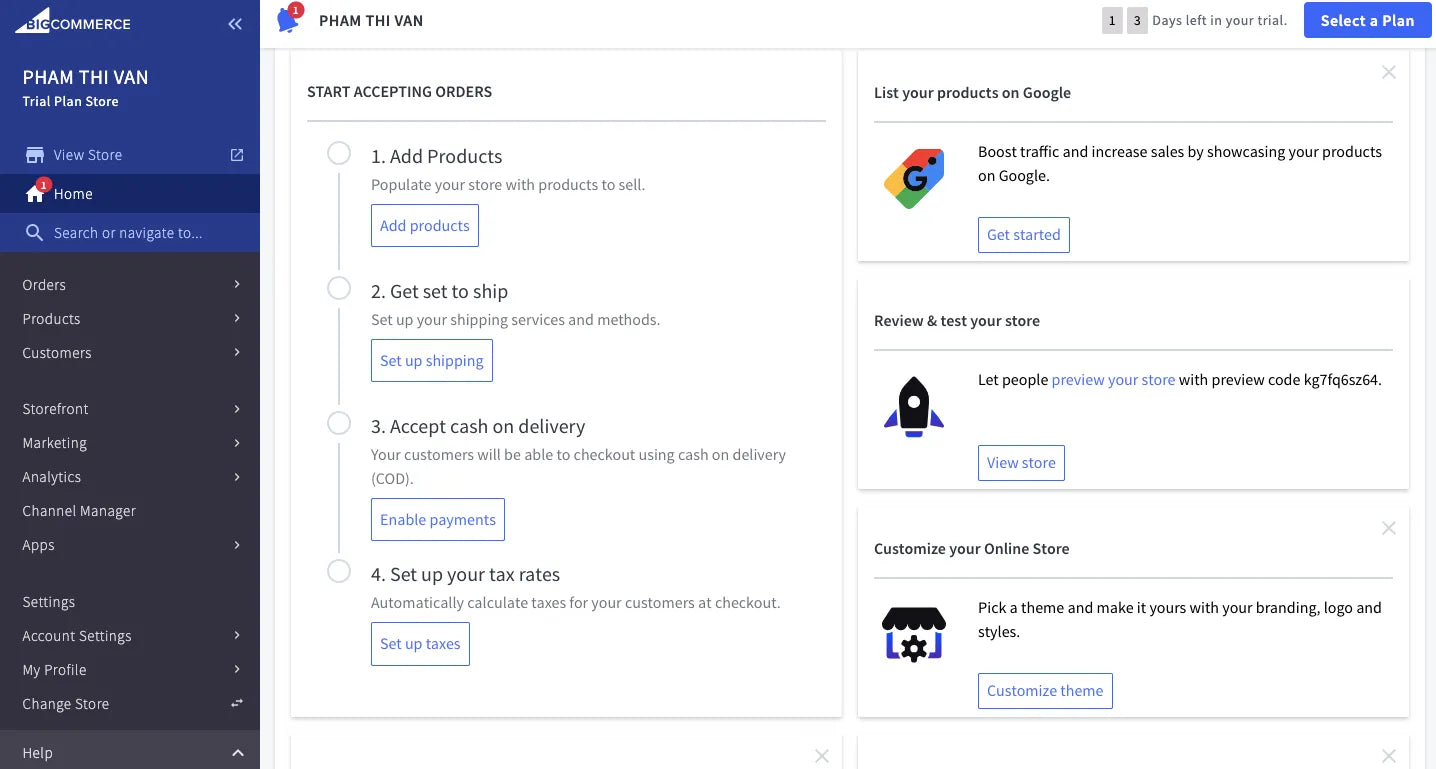
For beginners, this “Add Product” dashboard might be confusing
SITE123
SITE123 is a beginner-friendly website platform designed to help you get online as quickly as possible.
If you prefer to avoid complicated design tools, SITE123 keeps everything simple and easy to follow. Compared to more flexible platforms like Wix or design-focused builders like Squarespace, it uses a more guided approach. Instead of full drag-and-drop control, you build your site using ready-made layouts and sections.
The trade-off is that it’s less flexible and not as advanced as platforms designed for complex eCommerce, custom design, or content-heavy websites.
SITE123 also offers a free plan that includes hosting and the website editor, and it supports both one-page and multi-page websites.
AI capabilities:
SITE123 does not currently present a broad AI suite, but it offers AI-driven color generation by analyzing uploaded images or logos to create custom, cohesive palettes.
Key features:
-
Simple, guided website editor
-
Free hosting included
-
Mobile-friendly design
-
SEO tools
-
eCommerce support (basic)
-
Custom forms and image galleries
-
One-page and multi-page website options
-
Pre-designed templates
-
Email marketing tools
-
SSL security for websites
Pros:
-
Very easy to use (great for beginners)
-
Fast setup with guided steps
-
Free plan available
-
Hosting included
Cons:
-
Limited design flexibility
-
No full drag-and-drop control
-
Not ideal for large or complex websites
Pricing:
-
Free plan available (with hosting and editor)
-
Paid plans start from $7.8/month (annual billing)
Best for:
SITE123 is best for beginners, small businesses, freelancers, service providers, portfolios, simple blogs
Our experience with SITE123
All templates of SITE123 are free to use, but on the free plan, you can only use them in their most basic form.
The builder works with pre-designed sections like testimonials, menus, and galleries. You can choose different layouts (like grid or slider), which makes it easy to build pages quickly without worrying about design.

The editing interface in SITE123 is straightforward and well-organized, but also limited
However, the layout is quite limited. Everything follows a single-column structure, so you can’t place elements side-by-side (like a contact form next to a map). This keeps things simple, but it also limits how creative you can get with your design.
Webflow
Webflow is not your typical website builder. It’s built for people who want full control over design and structure, without needing to hand designs off to developers.
Instead of a simple drag-and-drop experience, Webflow gives you more front-end control, CMS flexibility, and clean design systems. That’s why it’s especially popular with designers, agencies, startups, and marketing teams that care about branding and performance.
One thing to note is that Webflow separates Site plans (for individual websites) and Workspace plans (for team collaboration). This makes pricing a bit different compared to all-in-one builders.
AI capabilities:
-
AI site builder to generate websites from ideas
-
AI tools for design, content, and optimization
AI access depends on workspace, site plan, and certain add-ons, but Webflow clearly positions AI as part of the whole workflow rather than a one-time setup tool.
Key features:
-
Visual website builder with advanced control
-
CMS for dynamic content (blogs, collections)
-
Responsive design tools
-
Built-in SEO features
-
Template and cloneable libraries
-
Webflow Marketplace for apps and integrations
-
Hosting and web app support
-
eCommerce capabilities (via ecosystem)
Pros:
-
Powerful design and layout control
-
Strong CMS for content-driven sites
-
Great for agencies and branded websites
-
Growing AI capabilities
-
Large template and inspiration library
Cons:
-
Steeper learning curve
-
Not ideal if you just want a quick, simple site
Pricing:
-
Starter: Free
-
Basic: ~$14/month (billed yearly)
-
CMS plan available for content-heavy sites
-
Pricing varies depending on Site vs Workspace plans
Best for:
Webflow is best for designers, agencies, SaaS companies, marketers
Our experience with Webflow
When we tested Webflow, we found it’s not the easiest tool for beginners, but it’s very powerful once you get used to it.
The builder technically uses drag-and-drop, but it feels more advanced than most platforms. We liked that once we clicked on an element, we could immediately access all customization options, which made the design process quite flexible.

Webflow is a great choice if you want full control and professional-level design, but it does take some time to learn.
Using templates definitely helps speed things up, especially if you’re new. However, the biggest challenge is the learning curve. Webflow uses more technical terms and concepts, so if you’re just starting out, it can feel a bit overwhelming and slow you down at first.
Simvoly
If you’re focused on generating leads and maximizing conversions, Simvoly is a great option to consider.
Simvoly is a newer website builder that’s built around sales funnels, upsells, and conversion flows rather than just traditional websites. Instead of using separate tools for landing pages, email capture, and checkout, you can manage everything in one place.
It also offers strong white-label features, which is especially useful if you’re an agency or want to resell the platform under your own brand.
AI capabilities:
-
Magic Website Wizard to generate a site quickly
-
AI text assistant for content creation
Its positioning is more about speeding up page and site creation than offering a very broad AI suite like Wix or Hostinger.
Key features:
-
Drag-and-drop website builder
-
Built-in sales funnels
-
One-click upsells and downsells
-
Custom checkout pages
-
CRM system
-
Email and SMS automation
-
Appointment scheduling
-
Online store (physical, digital, services)
-
Communities and course creation
-
Video hosting
-
Third-party integrations
-
White-label and SaaS reselling options
Pros:
-
Strong focus on funnels and conversions
-
Websites and funnels in one platform
-
Built-in CRM and automation tools
-
White-label options for agencies
Cons:
-
Not ideal for content-heavy sites like blogs
-
May not suit very large eCommerce stores
-
Best value mainly for funnel-driven businesses
Pricing:
-
14-day free trial available
-
Website plans start from $12/month
Best for:
Simvoly is best for agencies, funnel marketers, coaches, consultants, course creators, service businesses
Our experience with Simvoly
The overall building experience feels modern, you can drag and drop elements easily and customize pages without any coding.

The widgets give you the flexibility to experiment with different layouts and easily add or remove elements as needed.
Adding pages is simple, and we liked how you can set URLs, choose page types (like Home or Contact), and even password-protect pages.
However, navigation management isn’t as flexible. We couldn’t easily drag and reorder pages in the menu, and creating subpages takes a few extra steps compared to builders like Wix or Squarespace
How We Picked These Website Platform
To create this best website platform list, we combined official information with real testing to make sure our recommendations are practical and reliable.
First, we reviewed each platform’s official website to understand its features, pricing, and positioning. This helps ensure all the details are accurate and up to date.
Next, we tested each platform ourselves. We built sample websites, explored the editors, and tried key features like design customization, eCommerce setup, and integrations.
We also looked beyond our own experience by reading feedback from real users on platforms like Trustpilot, as well as discussions on forums such as Reddit and Quora.
Finally, we focused on a few core categories when comparing platforms:
-
Ease of use
-
Design flexibility
-
eCommerce capabilities
-
Features and integrations
-
Pricing and overall value
Final Verdict
There’s no single “best” website platform for everyone, it really depends on what you want to build and how you plan to grow.
If your main goal is to sell products, Shopify is the strongest all-around choice, while BigCommerce is better suited for larger or more complex stores.
If you’re a beginner or small business owner, Wix and SITE123 make it easy to get online quickly without technical skills. For those on a tight budget, Hostinger offers great value at a very low cost.
If design and branding matter most, Squarespace and Webflow give you more creative control, just keep in mind that Webflow comes with a steeper learning curve.
For content-heavy websites like blogs or media sites, WordPress.com is still one of the most flexible options, especially with its large plugin ecosystem.
If you still have any concerns, feel free to contact us, we’re always here to help.
FAQs about Best Website Platform








