As an eCommerce retailer, your biggest priority should be knowing how to increase your Shopify conversion rate.
But what is a good Shopify conversion rate? And how do you increase your conversion rate on Shopify?
What is A Conversion?
A conversion happens when a visitor completes a specific action on your website that aligns with your business goals. What counts as a conversion can vary from one website to another, depending on what the marketing team defines as success.
For some businesses, a conversion might be an interaction, such as signing up through a popup or clicking a key call-to-action. For others, it may be a completed purchase. The definition is flexible and should reflect what matters most to your growth.
In ecommerce, conversions are typically tied to actions that directly influence business performance. These often include placing an order or sharing contact details like an email address, which allows brands to continue engaging and marketing to potential customers over time.
In short, a conversion is any measurable action that moves a visitor closer to becoming a customer or strengthens their relationship with your business.
What is A Conversion Rate?
A conversion rate is the percentage of visitors to a website who complete a desired action, known as a "conversion." This could be making a purchase, signing up for a newsletter, filling out a form, or any other goal you set.
To calculate it, simply divide the number of people who completed the action by the total number of visitors, then multiply by 100 to get a percentage. It’s a handy way to see how effective your website is at turning visitors into engaged customers!
Average ecommerce website converion rate benchmarks?
According to industry leaders, the average conversion rate for e-commerce websites is typically between 2.5% and 3%. While this is a good baseline to aim for, a higher rate is always possible through optimization.
A study by the Shopify analytics app, LittleData, found that the average conversion rate for Shopify stores is slightly lower, at 1.4%. If your store's conversion rate is 3.2% or higher, it puts you in the top 20% of all Shopify stores. Achieving a 4.7% conversion rate places you in the top 10%.
Why Should You Monitor Your Shopify Conversion Rates?
Monitoring your conversion rate provides you with a way to measure the performance of your website as well as the performance of your applications. With an accurate grasp of your Shopify conversion rate, it becomes much easier for you to identify the areas in which you need to make improvements. These are the kinds of changes that can lead to a sizable boost in your total conversions rate.
Common ecommerce conversion rate misconceptions?
There are several misunderstandings that often arise when people talk about ecommerce conversion rates. Clarifying these points helps ensure metrics are interpreted correctly and decisions are based on accurate data.
Sessions, not users Analytics platforms typically track visits as “sessions” and identify individuals or devices as “users.” A single user can generate multiple sessions over time. For example, if someone visits your store one day and returns the next, that counts as one user with two sessions. Ecommerce conversion rate is calculated by dividing the number of orders by the number of sessions during a given period, not by users. Calculating the rate using users can artificially inflate the results. While some marketers suggest using users, especially for high-ticket products that require multiple visits before purchase, sessions remain the standard measurement across the industry.
Confusing overall conversion rate with ecommerce conversion rate Overall conversion rate measures the percentage of sessions that result in any defined conversion action. This may include newsletter signups, presale registrations, or adding items to the cart, in addition to purchases. Ecommerce conversion rate, on the other hand, focuses exclusively on completed orders. Because it includes fewer actions, ecommerce conversion rate is usually lower than the overall conversion rate. Mixing these two metrics can lead to inaccurate performance assessments.
How are Ecommerce Conversion Rates Measured?
Ecommerce conversion rate is tracked using website analytics tools that monitor visitor behavior and purchase activity. Google Analytics is the most widely used option and primarily focuses on on-site data, but it is not the only way to measure this metric. Many businesses rely on additional platforms depending on their marketing setup and data needs.
Some commonly used alternatives include:
Segment: Collects and unifies data from multiple sources, such as paid ads on platforms like Facebook and Instagram, creating a more complete view of customer activity.
Heap: Similar to Segment, but offers greater flexibility in defining and customizing tracked events compared to Google Analytics.
Triple Whale: Designed to track the full customer journey across channels, including social media interactions and search behavior, not just website visits.
Most analytics platforms function in a similar way. They provide a small piece of tracking code that is added to your website. This code identifies when a session begins and ends and records key actions, such as completed orders. Marketers or developers typically configure these events to ensure accurate data collection.
Choosing the right analytics tool depends on several factors, including your budget, acquisition channels, and advertising spend. Businesses with higher ad spend often require more advanced analytics and attribution solutions to properly understand performance across multiple touchpoints.
How To Calculate Conversion Rates?
In ecommerce, a conversion is most commonly defined as a completed purchase. While other actions, such as signing up for a newsletter, can also count as conversions, this example focuses specifically on sales.
To calculate your ecommerce conversion rate, follow these steps:
1. Measure total website visitors Start by identifying the total number of visitors to your website within a specific time period. Analytics tools such as Google Analytics can provide this data. Be sure to include all visitors, whether or not they completed a purchase.
2. Track total conversions Next, record the number of completed orders during the same time frame. This information is typically available in the Sales reports within your Shopify admin dashboard.
3. Apply the conversion rate formula Once you have both figures, calculate your conversion rate using this formula:
Conversion Rate = (Number of conversions ÷ Number of visitors) × 100
For example, if your store received 1,000 visitors and 20 purchases were made, the conversion rate would be (20 ÷ 1,000) × 100, resulting in a 2% conversion rate.
When analyzing performance, always ensure that both visitor and conversion data are taken from the same period. Comparing mismatched time frames can lead to misleading results.
How To Increase the Conversion Rate For Your Shopify Store?
There are plenty of proven ways to increase your Shopify conversion rate. Here are a handful.
1. Stop cart abandoners with a last-minute offer
Cart abandonment is a big challenge, with about 66.5% of customers leaving items in their cart. To combat this, try creating urgency with limited-time offers, like “free shipping for the next 10 minutes,” to encourage them to complete their purchase.
Using a cart abandonment popup can also help reduce abandonment rates. A well-timed popup reminding customers of their items, or offering a small discount, can often be enough to bring them back to the checkout, potentially lowering abandonment by up to 20%.
Your conversion rate is one of the most important metrics to monitor.
2. Remind return visitors of where they left off
To help returning visitors complete their purchase, remind them where they left off. Many shoppers don't buy on their first visit, especially for higher-priced items like mobile devices.
For these return customers, make their experience as seamless as possible. You can do this by showing them the products they viewed during their previous visits, letting them pick up right where they left off with just one click.
This small but effective feature can help increase the chances of conversion by reducing friction and making the shopping process easier.
3. Encourage coupon redemption with reminders
Many store owners offer coupon codes, but sometimes customers forget to use them. To fix this, you can add a reminder on your website using a sticky bar. This is a small, visible bar that stays on the screen while the customer shops, reminding them about the coupon they have.
By showing this reminder, you make it easier for customers to apply their discount when they checkout. This simple trick can help more people use their coupons, leading to more sales.
In fact, many stores see up to a 50% increase in coupon redemptions when they use this method. It’s an easy way to get more customers to take advantage of your discounts!
4. Test landing pages with different value propositions
Low conversion rates on landing pages often occur when your Unique Selling Proposition (USP) isn't clear or compelling.
To solve this, test different versions of your value proposition to see which one resonates best with your audience. Use the insights gained to craft stronger headlines and attract more customers to your site.
This strategy can potentially boost your landing page conversion rates by up to 50%.
Important note: GemPages is one of the most popular landing page builders for Shopify. Thousands of merchants use GemPages to create their store and landing pages.
5. A Strong CTA
Do you know how to increase the conversion rate on your website? Well, a solid call to action (CTA) can do wonders. It is as necessary as anything else to have a concise and easy-to-understand CTA to encourage visitors to purchase your products.
Your Shopify website should have a theme, and the CTA should match your branding/color scheme.
6. Social Proof
In today's world, if you want to compete with the finest in the eCommerce market, displaying social proof is really important.
For the purpose of increasing the conversion rate of a website, it is imperative that you make your social media shares and any customer endorsements available on your website.
7. A Popup Form
Are you wondering how a popup form can lead to high converting product pages?
To begin with, a popup form is an effective and efficient method of acquiring information regarding prospective buyers. Second, you can encourage them to fill out the popup form by giving them some type of reward, such as a discount or an incentive. That is one way that you can successfully boost your eCommerce conversion rate.
8. Recommend relevant products in blog articles
If your blog isn't generating the sales you hoped for, don't worry—there's a simple way to change that.
Consider embedding product recommendations directly within your blog posts. By including high-quality product images alongside your content, you give readers a clear visual representation of what you're talking about. This makes it easier for them to imagine owning the product.
This is one template for Blog Pages by of GemPages.
You don't need to over-explain—keep the detailed product descriptions on your product pages. Just add those compelling images in your blog to catch the reader’s eye, leading to better engagement and higher chances of converting a visitor into a customer.
9. Free Shipping
Many clients are reluctant to make purchases from websites where they must pay a shipping fee, even though practically all websites charge a shipping fee. That means that by providing free shipping you can differentiate your brand from others.
Your Shopify conversion rate will see a significant increase as a result of this one change.
10. A Catchy Headline
There is no question that the headline will be the very first thing that potential consumers look at when they visit your website. Because of this, the headline needs to be attention-grabbing so that it can convince people to make a purchase.
A title that emphasizes the benefits of the products must be included on each and every one of Shopify's product pages.
11. Detailed Product Descriptions
In order to have high converting product pages, you need to start ranking in search engine results pages (SERPs), and you won't be able to do that without having optimized your product descriptions. Make sure that you write product copy that is easy to read and does not contain any unnecessary fluff when describing the characteristics of your products and the ways in which they can improve the lives of your customers.
Because the keywords you employ can have a significant impact on where your website ranks in Google's search results, it is in your best interest to select keywords that are competitive and highly related to the things you sell.
Creating videos that are captivating and appealing is the best strategy to take these days if you want to thrive in the e-commerce sector and see an improvement in your Shopify conversion rates. We even advise readers that they offer a brand story through the medium of video in order to facilitate the formation of a connection between their brand and their customers.
You don't even need to have extraordinary video editing skills because there are standard templates available that can help you make a gorgeous final version of a product video.
GemPages Features To Boost Your Shopify Conversions
Although the struggle is real when it comes to improving eCommerce conversions, you don’t need to be concerned because there are plenty of GemPages features you can use to boost your conversions. Here are the top features:
1. Lazy Loading
Lazy loading is a programming approach that delays the process of initializing or constructing an object until it is actually needed. Online images, in general, fall under this category. In addition to improving speed and performance, this feature will also give the user the impression that the page loads faster than it actually does.
Lazy Loading is important to make sure that your page loads quickly.
Launch high-converting landing pages with GemPages
Quickly create compelling, conversion-optimized landing pages to wow visitors and convert them into buyers.
2. Stock Counter
GemPages stock counter feature enables you to add an inventory counter to your product page. You can display notifications for low-stock, out-of-stock, or overstock situations with a variety of customization choices. When visitors get the message that a particular product is low in supply, it will encourage them to make a purchase quickly.
The Product Bundle feature allows you to create special offers by grouping related products together at a discounted price. This can increase average order value by encouraging customers to purchase more items in one go.
You can customize the bundle's design and display it directly on your product pages, making it an effective way to increase conversions while providing more value to your customers.
GemPages' Image Comparison feature allows you to add a before-and-after image slider to your product pages. This is especially useful for showcasing product transformations, such as skincare results or product improvements.
By visually demonstrating the difference, customers can easily see the value of your product, making them more likely to complete a purchase.
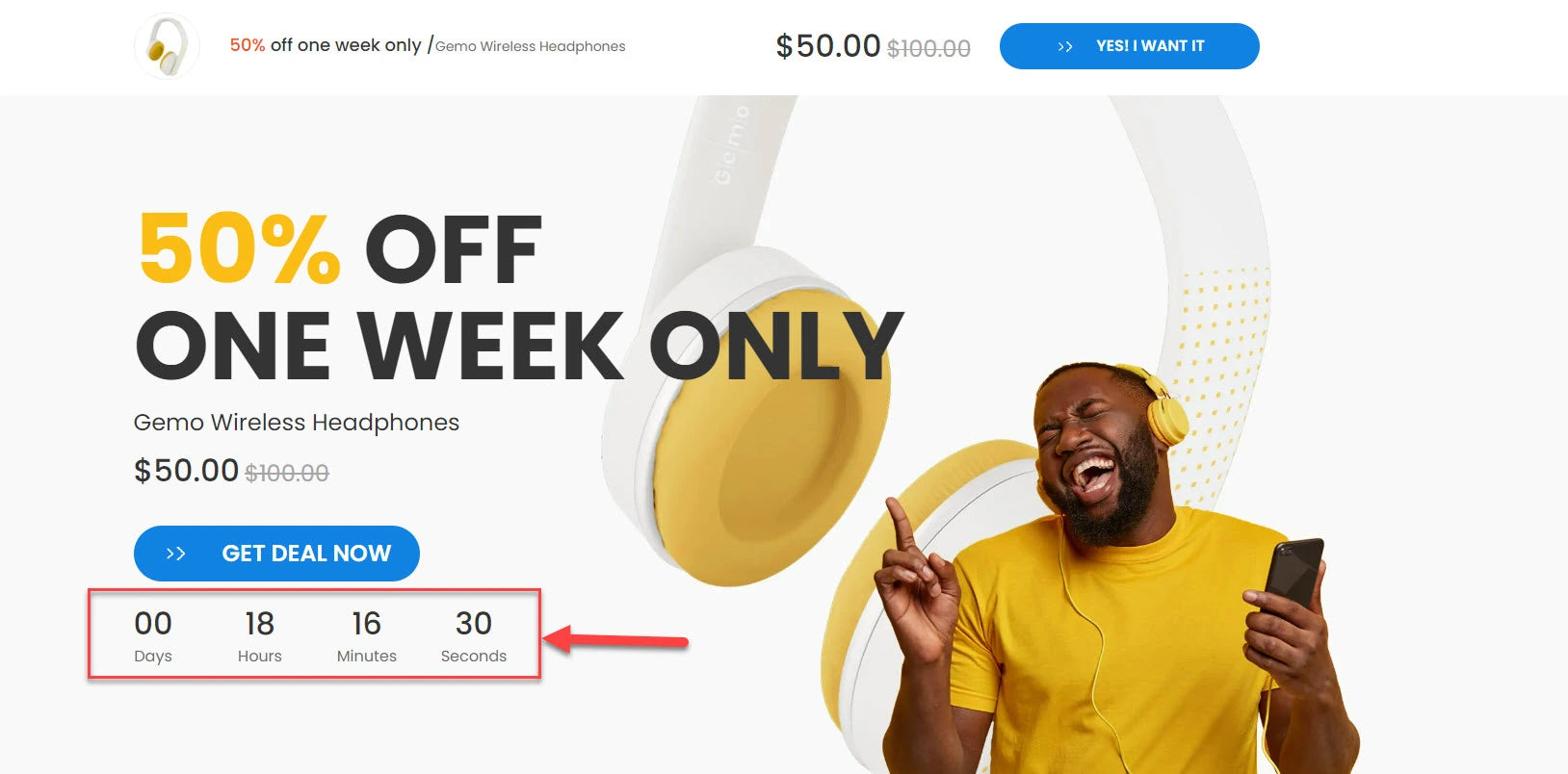
5. Countdown Timer
A countdown timer is a useful feature of GemPages that you can include in any e-commerce platform. When the clock starts ticking, customers panic about missing out on sales and are more likely to make a purchase.
Important note: You can try GemX to streamline this process. With GemX, a cutting-edge Shopify app focused on CRO and A/B testing, you can create and test multiple landing pages for the same product effortlessly.
Your store needs some bells and whistles?
Explore GemPages' features and see what works best for your store. Free plan available. No strings attached.
Top 10 Shopify Apps To Boost Conversions
Obviously, there are a lot of ways to improve eCommerce conversions. Here are a bunch of apps that can help.
This is another incredible app you can use to improve eCommerce conversions. As it boosts your website’s AOV and checkout flow. You can also expect this app to improve the shopping experience of your users.
ReConvert's conversion focused post purchase upsell funnel helps you grow AOV & maximize the profit of every sale
Using this amazing application, you cannot only measure the performance of your eCommerce business, but you can also optimize it to perfection. If your Shopify conversion rate is one of your primary concerns, using this app is one of the best options you have to make things work in your favor.
Recharge is the leading subscription management solution
With robust options for photo reviews, wish lists, loyalty programs, gift cards, referrals, and user-generated content (UGC), Growave is an all-in-one Shopify marketing app you can rely on to improve your Shopify store.
Boost customer loyalty & repeat purchases with Growave
Small and large retailers can automatically create more money and raise their store AOV thanks to the bundles-app PickyStory. With high-performing bundle layouts, you can offer enticing packages throughout your store. PickyStory provides a range of package offerings to assist your visitors at each stage of the purchasing process.
Adding Shopify apps that add a loyalty program or bundles can also boost your conversions.
AMP Upsell is a powerful tool for increasing Average Order Value (AOV) and revenue by strategically placing one-click upsells before and after purchase. With AMP Upsell, you can inspire customers to add related products and accessories on key pages like the Product, Cart, and Thank You pages, boosting the number of items in each transaction.
Supercharge AOV and Revenue with Pre and Post Purchase One-Click Upsells.
Rise.ai helps grow customer retention and loyalty with innovative Store Credit rewards and Gift Cards, offering actual cash value credits instead of points. This app supports a robust loyalty program that boosts Average Order Value (AOV) and upsells through customized Cashback workflows, providing a higher return on investment than traditional discounts.
Boost Retention and RPRs with Store Credit, Gift Cards, Cashback, Refunds, Loyalty & Memberships
Loox is a visually appealing social proof app designed to build trust and boost sales by showcasing authentic product reviews. It automatically collects customer reviews with photos and videos, adding a personal touch to product feedback. Loox’s fully customizable widgets integrate seamlessly into your store without affecting load speed, ensuring a smooth browsing experience.
With Loox grow your brand with social proof that looks amazing - product reviews, photos, videos & referrals.
Pop Convert helps you grow your subscriber base and drive sales by adding customizable pop-ups, banners, and smart bars to your store. You can prompt customers to share their email or phone number and even integrate webhooks for seamless data collection.
With Pop Convert, you can keep customers informed with smart announcements that blend naturally with your store's design.
Use popups and banners to collect emails and phone numbers from visitors and boost sales!
Releasit COD Form & Upsells simplifies the ordering process by allowing customers to place Cash on Delivery orders in a single click, bypassing the usual Shopify checkout steps. The app offers an intuitive form builder to create a custom COD order form, along with built-in upsells and quantity offers to boost Average Order Value (AOV).
Create a 1 Click COD order form with Upsells, Offers and more! Increase your conversion rate and AOV
Wrapping Up
There you have it, a guide on how to increase your shopify conversion rate. It is undoubtedly a challenging task to compete in the online world, but we are certain that following the tips and tricks of this guide can help increase Shopify CRO to a level you can only dream of without the right tactics.
Moreover, now you have a good idea of what a good shopify conversion rate is, you can easily analyze where your website is in terms of conversion.
So, all you need to do is follow all the provided instructions, and you will experience a significant boom in the conversion rate of your website.
FAQs about Shopify Conversion Rates
What is a good conversion rate for a Shopify store?
A good Shopify conversion rate typically ranges from 2 percent to 4 percent for most stores. High performing stores with strong traffic quality, clear messaging, and optimized checkout flows can achieve higher conversion rates depending on niche and product type.
Why is my Shopify conversion rate low?
Low conversion rates often come from unclear value propositions, slow page speed, weak product pages, lack of trust signals, or complicated checkout processes. Poor traffic quality from ads or SEO can also negatively affect conversions.
How can beginners improve Shopify conversion rates?
Beginners should focus on simplifying page layouts, improving product descriptions, adding social proof, optimizing page speed, and making calls to action clear and visible. Small changes can lead to noticeable conversion improvements.
Does traffic source affect Shopify conversion rate?
Yes. Traffic from high intent sources such as email marketing or branded search usually converts better than cold traffic from paid ads or social media. Understanding traffic quality helps set realistic conversion benchmarks.
Which tools help track and improve Shopify conversion rates?
Common tools include Shopify Analytics, Google Analytics, heatmaps, and A B testing platforms. Page builders like GemPages combined with testing tools make it easier to optimize layouts and measure conversion performance without coding.


 Facebook Community
 Change Log
 Help Center




![How to Become an eCommerce Expert for Shopify [2026]](http://gempages.net/cdn/shop/articles/ecommerce_expert_-_thumbnail_e8eaf7df-a923-4b6e-bdd5-0881f6b818f0_480x480.webp?v=1780039642)







